 Skip to content
Your Site’s Navigation Isn’t a Menu – It’s a Conversation
Getting the navigation patterns right is the key to structuring a successful multi-page site. You’ve spent hours mapping it all out. You’ve got a beautiful sitemap, a perfect content hierarchy, and every page has a clear job. But here’s the gut-check moment: how do real people actually move through it all? The best structure in the world is worthless if visitors feel lost the second they land.
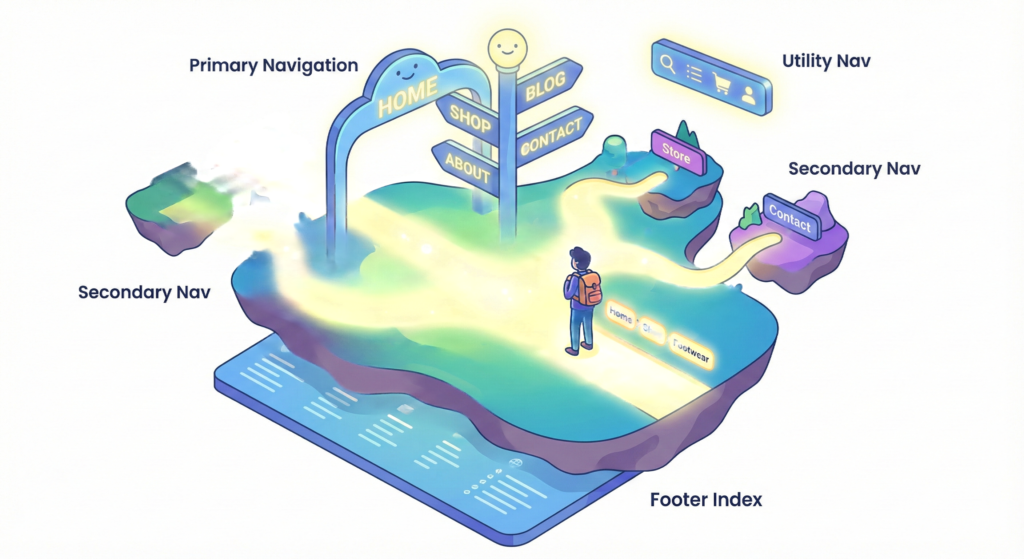
This is where thinking about navigation patterns changes everything. I’m not just talking about the bar at the top of the page. I mean the entire ecosystem of paths, the main highways, the side streets, the quick shortcuts, that guide someone through your website. Good navigation feels effortless. Bad navigation feels like every door is locked, leaving users to fumble for the handle or just walk away.
Think of your site like a department store. Your sitemap is the floor plan. Your navigation patterns are the signs above the aisles, the directory at the entrance, and the helpful employee pointing you to shoes. Without them, you’ve just got a warehouse full of stuff. Let’s talk about how to build the signs.
Why Getting Navigation Patterns Right Isn’t Just “Design”
This isn’t about making things pretty. It’s about psychology and practicality. Here’s what’s really at stake when you nail your navigation patterns for multi page sites.
- It Stops People from Thinking. Users don’t want to figure out your system. Clear, predictable paths let their brains focus on their goal, like buying those shoes or reading that article, instead of decoding your interface.
- It Meets Expectations. People arrive with built in assumptions. They look for “Contact” at the top or bottom. They expect a cart icon in the corner. Following common navigation patterns means you’re speaking their language from the start.
- It Helps Google Help You. A logical navigation structure is how search engines crawl and understand what’s important on your site. It’s the backbone of your internal links.
- It Keeps People Around. If someone can’t find what they need in a few clicks, they’re hitting the back button. Smart navigation is your best defense against a high bounce rate.
- It Makes You Look Professional. A site that’s easy to move through just feels more trustworthy and credible. It signals you’ve got your act together.
Essential Navigation Patterns for Multi Page Sites
A solid website doesn’t use just one pattern. It layers a few together, each with a specific job. Here’s your toolkit for effective navigation patterns.
1. The Primary Navigation Pattern: Your Main Street
This is your iconic menu bar, almost always in the header. It’s on every page and holds the 5-7 most important destinations in your whole site.
- What it looks like: Horizontal links on desktop, or a hamburger menu on mobile.
- What goes in it: The absolute core of your site. Think: Home, Services, Products, Blog, About, Contact.
- The golden rule: Keep it simple. If you have more than 7 items, you need to group them. Usability studies, like those from the Nielsen Norman Group, consistently show that overstuffed menus paralyze users.
- Example:
Home | Shop | Learn | About | Help
2. The Secondary Navigation Pattern: The Neighborhood Streets
This pattern shows up when you’re already in a section, helping you explore deeper. It’s for drilling down.
- What it looks like: A sidebar menu, a row of tabs under the main header, or the panels in a mega menu.
- What goes in it: All the sub pages within a section. For example, all the categories inside “Shop” or all the topics within your “Blog.”
- Pro tip: Use it to show people where they are. Visually highlight the current page or section (using
aria-current="page"is great for accessibility too).
3. The Utility Navigation Pattern: The Service Desk
These are the site-wide tools, not part of your content hierarchy. They’re for actions.
- What it looks like: Small text or icons, usually in the top corner or a very thin top bar.
- What goes in it: Log In, Cart, Search, Language, Support.
- Key insight: Make this look visually different from your main menu. You don’t want someone confusing their shopping cart with your product categories.
4. The Footer Navigation Pattern: The Master Index
The footer is your catch all. It’s where you put the important stuff people need, but not on every visit.
- What it looks like: Several columns of links.
- What goes in it: Legal pages (Privacy Policy, Terms), full sitemap, detailed contact/address, social media links, less visited categories.
- Don’t: Just dump every link you’ve ever created here. Group them under clear headings.
5. The Breadcrumb Navigation Pattern: The “You Are Here” Trail
This humble row of links is a secret weapon. It shows the path from the homepage to exactly where you’re standing.
- What it looks like:
Home > Electronics > Headphones > Wireless - When to use it: Perfect for sites with deep, clear hierarchies, like e-commerce stores, documentation, or news sites.
- Why it’s awesome: It takes almost no space, is great for SEO, and lets users jump back two steps with one click. It’s a quiet little powerhouse.
Choosing the Right Navigation Patterns
You don’t need all five. Ask yourself when structuring multi-page sites:
- How deep is my site?
- A few pages? A strong primary nav and a good footer might be all you need.
- Lots of pages and sections? You’ll want primary + secondary + breadcrumbs.
- What’s the main thing people do here?
- Browse & discover (blog, magazine): Clear categorical navigation patterns (primary/secondary) are key.
- Find something specific (support site): A powerful search bar (utility nav) is your MVP.
- Buy things (e-commerce): You need the whole orchestra: categories, filters, a persistent cart, and breadcrumbs to track the journey.
Navigation Patterns in Action: A Real-World Example
Imagine you’re on REI’s website looking at men’s hiking boots.
- Primary Nav:
Men’s > Women’s > Kids’ > Gear > Advice - Secondary Nav (after clicking “Men’s”):
Footwear > Clothing > Climbing > Cycling(likely in a sidebar or mega-menu) - Utility Nav (top right): Search icon, Cart icon, Member icon
- Breadcrumbs:
Home > Men’s > Footwear > Hiking Boots - Footer Nav:
Store Locator · Help Center · Returns · Membership · Sustainability
Each piece has a role. Together, they answer every possible question a visitor might have using established navigation patterns.
Best Practices for Implementing Navigation Patterns
- Be Boringly Consistent. Once you pick a pattern, stick to it. Don’t move the menu around or rename “Products” to “Solutions” on some pages. Consistency builds trust.
- Clarity Beats Cleverness. Avoid “creative” labels. “Synergize” is worse than “Services.” “Our Story” is better than “Narrative.”
- Design for Every Moment. What does a link look like when you hover? When you’ve clicked it? When it’s the current page? All these states need to be obvious.
- Build for Everyone. This is critical. Navigation must work perfectly with a keyboard, it must be readable by screen readers (use
<nav>and ARIA labels), and the colors need enough contrast. The W3C’s Web Accessibility Initiative sets the standard here. - Test with Real Humans. Use tools like tree testing before you build. After launch, watch heatmaps. See where people actually click, or where they get stuck and leave.
Pitfalls to Steer Clear Of (The “Anti-Patterns”)
- Mystery Meat Navigation: Unlabeled icons or cryptic buttons. A hamburger menu on a desktop site often falls into this trap.
- The Mega-Menu Dump: Opening a menu to find 50 unsorted links. It’s overwhelming. Organize, categorize, edit.
- Hiding the Important Stuff: Burying “Contact” or “Pricing” because you’re self conscious. If it’s important, make it easy to find.
- The Infinite Scroll Trap: On a long, scrolling page (like a blog feed), if your navigation disappears, you’ve trapped the user. A sticky header is an escape hatch.
The Bottom Line: Guide Users with Intentional Patterns
Building a multi-page site is an act of hospitality. You’re creating paths for real people, people who are busy, distracted, and just want to find something.
Your navigation patterns are your most direct way of talking to them. They whisper: “Looking for this? It’s over here. Need to get back? Here’s how.”
By mixing primary, secondary, utility, and helper patterns like breadcrumbs, you stop constructing mazes and start giving guided tours. Invest in this invisible framework. What you get back isn’t just a site that’s organized, it’s a site that feels helpful, building confidence with every click. And that’s the whole point of mastering navigation patterns.
New to HTML? Start Here: HTML Tutorial for Beginners: Your Complete Introduction to HTML Basics
[INSERT_ELEMENTOR id=”122″]

